MCP Architecture: Hosts, Clients, Servers, Tools, and Resources
A component-by-component guide to MCP architecture, including host and client responsibilities, server primitives, transports, and trust boundaries.
A component-by-component guide to MCP architecture, including host and client responsibilities, server primitives, transports, and trust boundaries.
The host owns the AI application, user experience, model coordination, and policy.
MCP architecture becomes straightforward when every component has a narrow responsibility and every trust boundary remains visible.
Host, client, and server can sound interchangeable when all three run on one laptop. In MCP, they describe protocol roles. Those roles remain useful whether the server is a local process or a remote service.
TL;DR
- The host owns the AI application, user experience, model coordination, and policy.
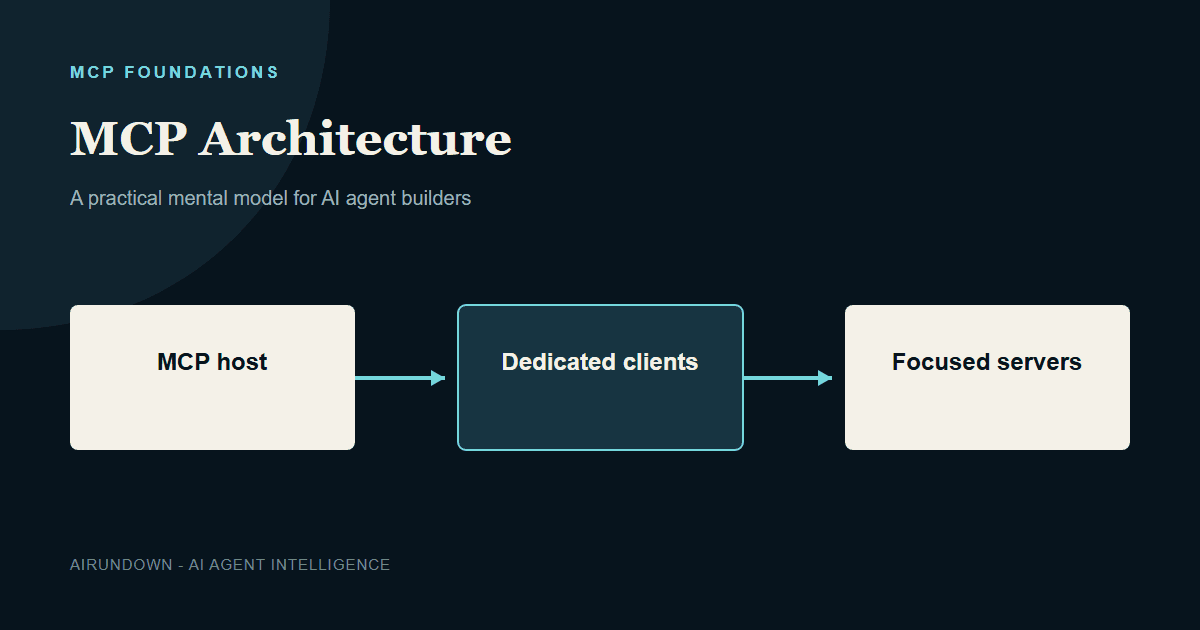
- The host creates a dedicated client for each server connection.
- Servers expose focused capabilities through tools, resources, and prompts.
- The data layer defines protocol meaning; the transport layer moves messages.
- Isolation and least privilege matter more than whether a server is local or remote.
The MCP host
The host is the application the user experiences: a coding assistant, desktop application, support agent, or internal copilot. It manages model calls, conversation context, server configuration, client lifecycle, permissions, and approval interfaces.
The host decides which server capabilities enter a session and which definitions reach the model. It can combine results from several servers while preventing one server from automatically seeing another server’s data or the whole conversation.
The MCP client
An MCP client is a host-side component that communicates with one server. If the host connects to filesystem, source-control, and issue-tracker servers, it normally maintains three client connections.
This one-client-per-server relationship creates a practical isolation unit. The host can apply separate credentials, timeouts, health state, logging, and revocation to each connection. A broken issue-tracker server does not need to take down the filesystem connection.
The MCP server
A server provides context or capabilities through MCP. It may wrap a local filesystem, a database, an internal service, or a remote SaaS API. The word server describes what the program does in the protocol, not where it runs.
A good server has coherent domain ownership. An order server may expose order lookup, shipment history, and carefully scoped actions. Combining payroll, deployment, calendars, and orders into one giant server makes permissions, testing, and incident ownership harder.
The three server primitives
| Primitive | Purpose | Control model | Example |
|---|---|---|---|
| Tools | Execute operations or retrieve computed information | Typically proposed by the model and controlled by the host | create_ticket |
| Resources | Expose readable contextual data | Selected and managed by the application | A policy document |
| Prompts | Expose reusable interaction templates | Often selected by the user or application | Investigate an incident |
Do not make every piece of data a tool. Reading a stable policy is naturally a resource. Creating a ticket is an action with a side effect and belongs in a tool with stronger controls.
Data layer and transport layer
The data layer defines structured protocol messages, lifecycle behavior, capabilities, and primitives. MCP uses JSON-RPC concepts for requests, responses, and notifications. The transport layer handles connection establishment, framing, and delivery.
Local servers commonly communicate over standard input and output. Remote servers commonly use Streamable HTTP. The same conceptual tool can be exposed over either transport, but remote deployment introduces network authentication, routing, rate limits, and multi-user isolation concerns.
A full architecture example
Consider a coding host connected to three servers. The filesystem client uses a local process with access limited to the current repository. The source-control client connects to a remote service using the developer’s scoped token. The incident client connects to an organizational server that exposes read-only alerts and an acknowledged action.
The host can let the model read repository files, inspect a failing commit, and retrieve an alert. If the model proposes acknowledging the incident, the host can show a confirmation. Each server receives only the arguments and context required for its operation.
Local and remote deployment compared
| Concern | Local server | Remote server |
|---|---|---|
| Process ownership | Often launched or supervised by the host | Operated as a network service |
| Identity | May inherit local user context | Requires explicit network authentication |
| Scaling | Usually tied to one machine or user session | May serve many users and tenants |
| Primary risk | Filesystem, process, and credential access | Tenant isolation, token scope, and network exposure |
Neither mode is inherently safer. The right design follows the data, users, operational ownership, and failure model.
How to choose a server boundary
Group capabilities when they share domain ownership, authorization rules, downstream systems, and operational lifecycle. Split them when they require different credentials, risk controls, administrators, or availability targets.
A server boundary should be understandable to the team that operates it. If disabling one capability requires taking unrelated business functions offline, the boundary is probably too broad.
Trust boundaries to draw explicitly
- User to host: What has the user asked for and approved?
- Model to host: Which model outputs are proposals requiring validation?
- Host to each client: Which session, tenant, and credentials apply?
- Client to server: Is the server trusted, authenticated, and within scope?
- Server to backend: Which downstream permissions and business rules apply?
- Result to model context: Could returned content be malicious, excessive, or irrelevant?
Common architecture mistakes
- Using one global credential across unrelated servers.
- Assuming a local server is safe because no network is involved.
- Giving a server the entire conversation when it needs one argument.
- Putting user-interface approval logic inside a reusable domain server.
- Creating a giant server with unrelated ownership and permissions.
My Take
The dedicated client-per-server boundary is worth preserving even when an implementation could hide it. It gives architects a clean unit for credentials, auditing, health, revocation, and blast-radius control.
Knowledge check
- Why does a host create multiple clients?
- Which primitive best fits a readable policy document?
- What new concerns appear when a server moves from local to remote?
Continue learning
Read MCP Client Architecture for a deeper client view and MCP Security and Permissions for production boundaries. Next in this pathway: MCP vs APIs.