What Is an AI Agent? A Practical Mental Model
A practical explanation of what makes an AI agent different from a chatbot or fixed workflow, and how the agent loop turns model reasoning into action.
A practical explanation of what makes an AI agent different from a chatbot or fixed workflow, and how the agent loop turns model reasoning into action.
An AI agent is a software system that uses an AI model to pursue a goal through decisions and actions.
An AI agent is more than a chatbot with a new label. It is a goal-directed system that can decide what to do next, use tools, observe results, and keep working within defined boundaries.
Ask a chatbot, “Where is my order?” and it may explain how delivery tracking works.
Ask an AI agent the same question and it can inspect the order, check the carrier, compare the promised delivery date, decide whether escalation is needed, update the support ticket, and return with the result.
That difference—moving from generating an answer to managing a task—is the simplest way to understand AI agents.
TL;DR
- An AI agent is a software system that uses an AI model to pursue a goal through decisions and actions.
- Its defining behavior is a loop: understand the goal, choose an action, use a tool, observe the result, and adapt.
- A model supplies intelligence; tools, state, instructions, permissions, and guardrails turn that intelligence into an agentic system.
- Agents are useful when the path cannot be fully specified in advance. Fixed workflows are usually better when the steps are stable and predictable.
- Autonomy is not all-or-nothing. A well-designed agent knows when to act, when to stop, and when to ask a human.
A practical definition of an AI agent
An AI agent is a goal-directed software system that can decide and perform the next useful action, evaluate what happened, and continue until it completes the task, reaches a stopping condition, or needs human input.
There is no single industry definition accepted in every context. Some teams use “agent” for any AI system that calls a tool. Others reserve the term for systems that can operate independently over many steps.
The practical middle ground is to focus on control:
The more the AI system controls the sequence of actions needed to reach a goal, the more agentic the system is.
This is also why an agent is not the same thing as a large language model. The model is a reasoning and language component. The agent is the complete system around it: instructions, tools, context, memory or state, permissions, execution logic, and safety controls.
The agent loop
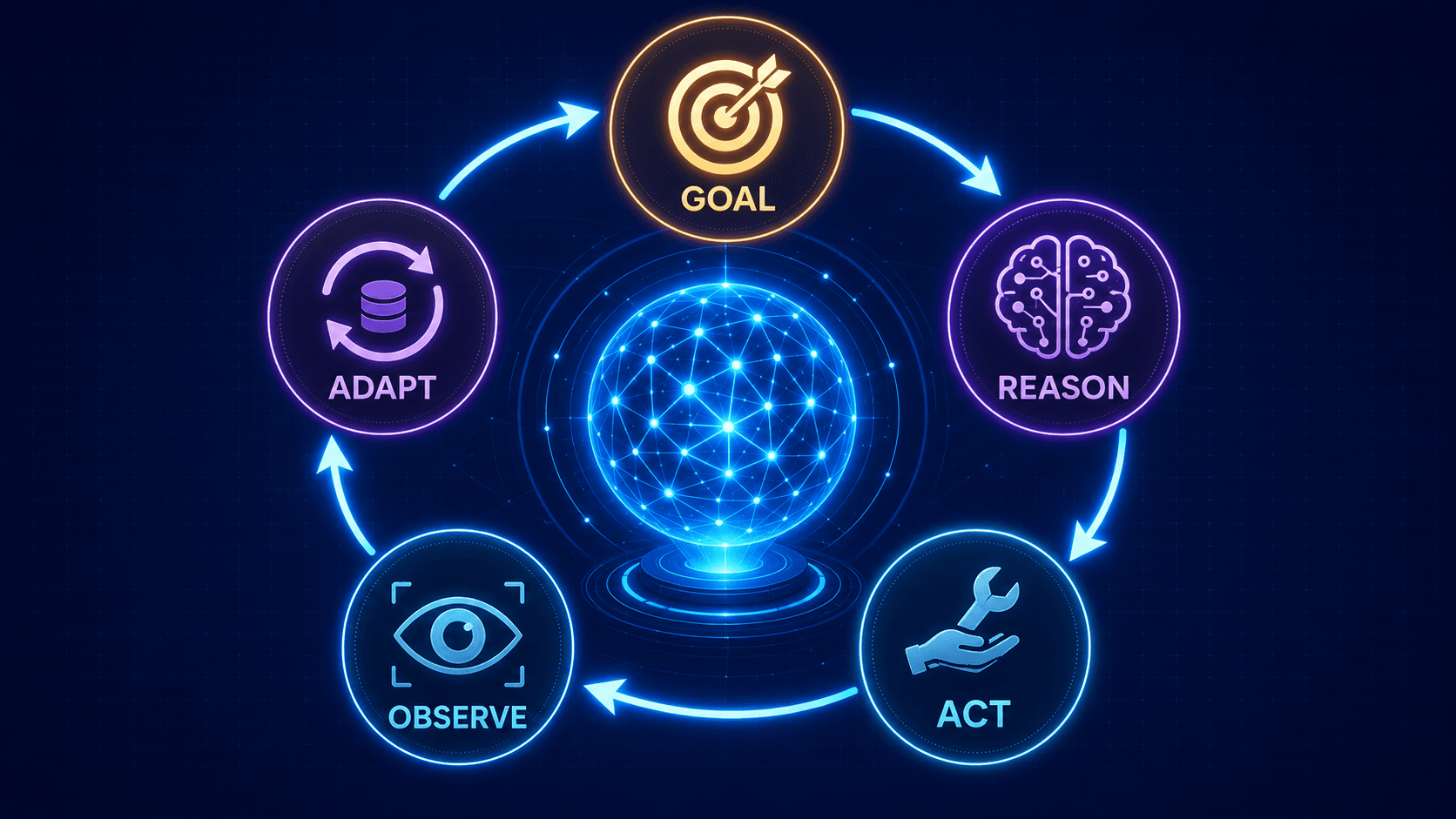
Most AI agents can be understood through five recurring stages:
- Goal: Interpret what the user or system wants to achieve.
- Reason: Decide what information or action is needed next.
- Act: Call a tool, query a system, run code, or ask the user.
- Observe: Read the tool result and compare it with the goal.
- Adapt: Update the plan, repeat, finish, or escalate.
The loop matters more than any specific framework. An agent does not merely produce a plan; it receives feedback from the environment and uses that feedback to choose its next move.
A simplified version looks like this:
Goal → Decide → Act → Observe → Update state → Decide again
                                  ↓
                         Finish, stop, or ask
The loop may run once for a small task or dozens of times for a complex one. Production systems normally add limits such as maximum steps, timeouts, spending caps, approval requirements, and defined success criteria.
What an AI agent is made of
Different platforms use different names, but most useful agents contain the following building blocks.
1. A goal and instructions
The goal describes the desired outcome. Instructions define the agent’s role, priorities, constraints, and operating rules.
“Help the customer” is too vague. “Resolve delivery-status requests using the order system; never issue compensation above $25 without approval” is operational.
2. A model
The model interprets the task, reasons over available context, selects actions, and produces responses. A stronger model may handle ambiguity and multi-step planning better, but the model alone is not the agent.
3. Tools
Tools allow the agent to affect or inspect the world outside the model. They may include:
- web or knowledge search
- databases and business APIs
- email, calendar, CRM, or ticketing systems
- code execution
- browser or computer control
- other specialized agents
Tools create usefulness—and risk. An agent that can read a calendar has different consequences from one that can cancel a meeting or send an invitation.
4. Context, state, and memory
The agent needs enough information to know what has happened and what remains to be done.
- Context is the information available during the current decision.
- State records progress in the active task.
- Memory preserves selected information across steps or sessions.
Not every agent needs long-term memory. Many only need reliable task state. Adding memory without a clear purpose can introduce stale, irrelevant, or sensitive information.
5. The orchestration loop
The orchestration layer runs the model, exposes tools, returns observations, tracks state, and decides whether another iteration is allowed. This is the runtime that turns individual model calls into sustained behavior.
6. Guardrails and permissions
Guardrails define what the agent must not do and what requires approval. Useful controls include restricted tool access, structured inputs, validation, audit logs, isolated execution, and human confirmation before consequential actions.
The important principle is simple: an agent’s authority should match the risk of the task.
A concrete example: resolving a delayed order
Imagine a customer says:
“My package was supposed to arrive yesterday. Please fix it.”
A basic chatbot might apologize and provide a tracking link.
A fixed workflow might always perform the same sequence: retrieve order → retrieve carrier status → show a standard response.
An agent can choose a path based on what it discovers:
- Identify the customer and order.
- Check the promised delivery date and live carrier status.
- Notice that the carrier has reported the package as lost.
- Read the company’s replacement and refund policy.
- Determine that a replacement is allowed but requires confirmation.
- Ask the customer whether they prefer a replacement or refund.
- Execute the approved action.
- Update the support ticket and explain the outcome.
The key is not that the process contains many steps. Traditional software can also execute many steps. The key is that the agent selects and revises the steps based on new information.
AI agent vs chatbot vs workflow
| System | Primary job | Who determines the path? | Can it take action? | Best fit |
|---|---|---|---|---|
| Chatbot | Generate a response | Mostly the user and prompt | Usually limited | Questions, drafting, simple assistance |
| Fixed workflow | Execute predefined steps | Developer-written logic | Yes | Stable, repeatable processes |
| AI agent | Pursue an outcome across changing steps | The model within system controls | Yes | Open-ended, multi-step tasks |
These categories overlap. A chat interface can be the front end for an agent. A workflow can contain one agentic step. An agent can also call deterministic workflows as tools.
The useful question is not “Does this product have an agent?” It is:
Which decisions are made by code, which are made by the model, and which are reserved for a human?
Are all AI agents autonomous?
No. Autonomy is a spectrum.
At one end, an assistant proposes an action and waits for approval. In the middle, an agent acts independently on low-risk steps but asks before sending, purchasing, deleting, or publishing. At the other end, an agent operates for long periods with broad permissions and limited supervision.
More autonomy is not automatically better. It can increase speed and reduce manual work, but it also expands the cost of a wrong decision.
A strong product design gives the agent:
- clear authority boundaries
- explicit stopping conditions
- checkpoints for high-impact actions
- a way to surface uncertainty
- a safe route back to a human
Where agents are genuinely useful
Agents are strongest when:
- the desired outcome is clear but the path varies
- the task requires information from several tools or systems
- intermediate results determine the next step
- success can be checked through observable evidence
- errors are recoverable or can be contained
Examples include investigating a technical incident, researching a complex question, updating code until tests pass, reconciling data across systems, and resolving non-standard customer-support cases.
When not to use an agent
Do not add an agent merely because the technology is available.
A fixed rule, search query, form, SQL job, or deterministic workflow is often the better choice when:
- the correct steps are already known
- consistency matters more than flexibility
- the action is high-risk and hard to reverse
- the result cannot be reliably verified
- latency or cost must be tightly controlled
Agents usually require multiple model calls and tool interactions. That can increase latency, cost, and the chance that one error affects later steps. Anthropic’s engineering guidance makes the same practical recommendation: start with the simplest system that works and add agentic complexity only when it improves the outcome.
Common failure modes
An agent can fail even when its underlying model appears intelligent.
It pursues the wrong interpretation
The user’s request may be ambiguous. An agent that acts without checking can complete the wrong task efficiently.
It uses the wrong tool or parameters
Poorly described tools, overlapping functions, and vague parameters can cause incorrect calls.
Errors compound across steps
A mistaken observation can lead to a bad plan, another bad action, and an increasingly convincing but incorrect result.
It stops too early—or never stops
Without clear success criteria and iteration limits, an agent may declare success prematurely or loop without making progress.
Its permissions are too broad
Tool access turns model mistakes and malicious prompt injections into real-world consequences. Least-privilege access and human approval are product requirements, not optional polish.
What builders and product teams should focus on
The hardest part is rarely choosing an agent framework. The harder questions are operational:
- What exact outcome owns the agent?
- What evidence proves the task is complete?
- Which tools and data does it truly need?
- Which actions are reversible?
- Where must a human approve or intervene?
- How will failures be observed, evaluated, and recovered?
Before building a complex agent, test whether a simpler prompt, retrieval step, or deterministic workflow can solve the problem. If an agent is justified, begin with narrow permissions, clear tools, observable state, and a small set of measurable tasks.
My Take
“AI agent” is most useful as a system-design term, not a marketing label.
The defining feature is not human-like personality, a robot avatar, or even long-term memory. It is delegated control over the next action. An agent receives a goal, chooses steps, interacts with an environment, and updates its behavior from what happens.
That is also why agent quality should not be judged only by how intelligent its answers sound. A production agent should be judged by whether it completes the right task, uses the right authority, exposes its progress, handles uncertainty, and fails safely.
The next concept to learn
You now have the basic mental model: goal + model + tools + state + loop + guardrails.
The next lesson is How AI Agents Work, where we will examine the execution loop in more detail—from the first user request to tool calls, observations, stopping conditions, and final output.
You can also return to the known learning path on the [Start Here page](/start-here/) or use the [AI Agents glossary](/glossary/) for unfamiliar terms.